


The Globe and Mail
4.2291.00 Reviews
App Specs
- Version
- 11.0
- Updated On
- License
- Free
- Downloads
- 500,000+
- Developer
- The Globe and Mail Inc.
- Categories
- News & Magazines
- Platform
- Android
Screenshots
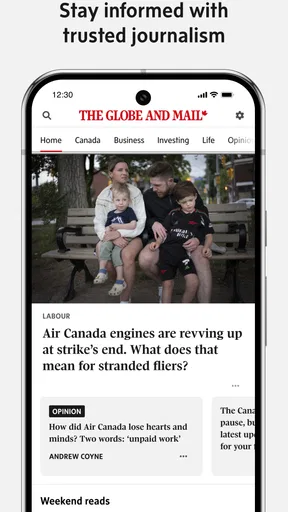
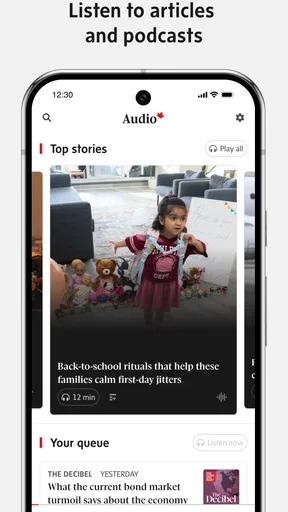
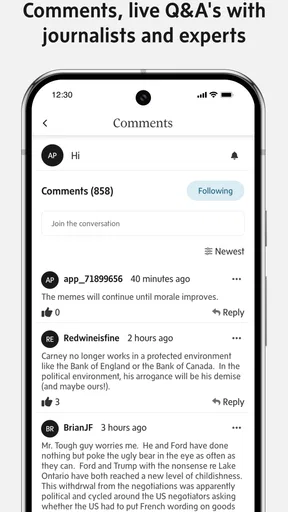
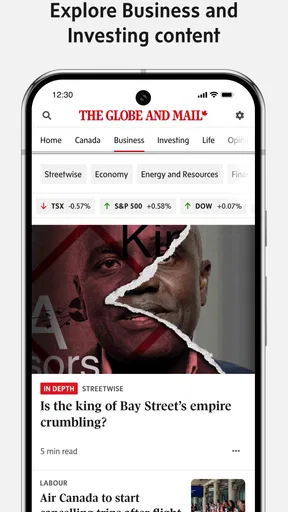
 Analysis by AppCompare
I judge a news app not just by what it publishes, but by how well it fits the small gaps in an ordinary day: a quick check before work, a longer read at lunch, or a headline opened while waiting for a ride. The Globe and Mail app is built around Canadian news and commentary, so it makes most sense for readers who want that focus on their phone rather than a general feed that treats every outlet as interchangeable. My experience is that it works best when I choose what deserves my attention instead of letting a stream of alerts set the pace.
That distinction matters because a dedicated publication app is not the same thing as a news aggregator. An aggregator is useful when I want a broad mix of publishers in one place; this app is a better fit when I want to follow the reporting and analysis associated with The Globe and Mail. The trade-off is straightforward: a more focused reading experience, but less breadth across competing sources. I would keep another source handy if my goal were to compare several outlets’ coverage of a developing story.
When a connection changes the reading experience
News reading depends on timing, and connectivity can shape that more than the interface does. A strong connection makes it easier to move from a headline into a full article, especially when a story includes substantial imagery. When service is weak, I would avoid opening several stories at once and give each page time to load. That simple habit can make a rushed check feel less frustrating, though it cannot make a patchy signal reliable.
For a developing Canadian story, I find it useful to separate two tasks: first, checking what has changed; later, sitting down with the full analysis. A quick look at the main feed can help me decide whether a story needs attention now, while a longer article is better saved for a moment when I can read without interruption. That is a practical way to use a news app on mobile, not a promise that every update will arrive instantly.
Notifications can help surface an important development, but I would treat them as prompts rather than a complete account of the news. A notification is naturally compressed; it cannot carry the context, qualifications, or competing details that make a reported piece worth reading. If a headline affects a decision I need to make, I open the story itself and check the explanation rather than acting on the alert alone.
Reading in the gaps of a mobile day
On a commute, in a waiting room, or between appointments, I prefer to decide in advance whether I have time for a headline scan or a full article. The app’s news focus makes it easy to start browsing, but a compelling analysis can take longer than the few minutes available. I use short breaks for orientation and leave deeper reading for a calmer stretch. That keeps a busy feed from turning into a stack of half-read pieces.
For example, I might check the app over breakfast, notice a business or political story that could affect a conversation later, and return to it during a proper lunch break. I do not need to treat every alert as urgent; I can use the first visit to identify what matters and the later visit to understand why. This two-pass routine is especially helpful when a headline is intriguing but the subject deserves more care than a quick glance.
Worth Reading Before You Choose

Flipboard Shows What News Apps Must Do Beyond the Feed

Switching to Android Auto Means Rethinking Your Driving Routine

Google Calendar Makes a Crowded Week Easier to Manage

Ludo King Makes the Most of the Minutes Between Plans

Baby Panda World Brings Quick Play to Modern Phones, but Its Game Library Feels Busy

ESPN’s Live Game View Makes Following Close Games Easier
That approach also helps answer whether the app suits a reader who only wants occasional headlines. It can still be useful as a focused place to check Canadian coverage, but someone who expects a broad, constantly refreshed mix of international publishers may prefer an aggregator. Someone who follows the publication closely and values its commentary is more likely to appreciate having its material collected in one app.
First Impressions and User Interface
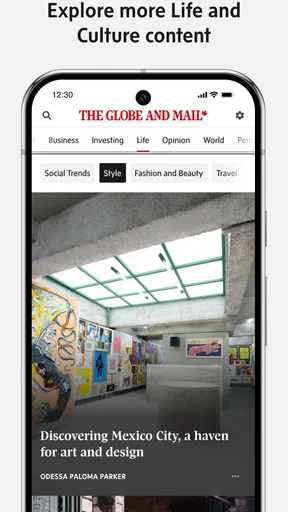
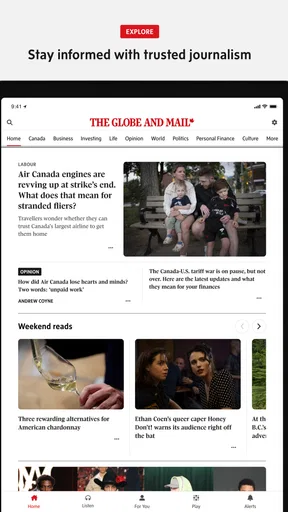
Alright, let's dive right into the nitty-gritty. The first thing I noticed about The Globe and Mail app is its sleek and intuitive user interface. It's like the designers knew exactly what I wanted — everything is laid out in such a user-friendly manner. The home screen greets you with top stories, and it's super easy to navigate. I mean, who has time to fiddle around with complicated menus, right?
The color scheme is pretty easy on the eyes, too. There's a nice balance of white space, which makes reading long articles a breeze. I appreciate how the designers kept it simple yet elegant. It’s a subtle reminder that sometimes less really is more.
Content Quality and Variety
Now, let's chat about the content. If you're familiar with The Globe and Mail, you know they don’t skimp on quality. The app brings the same high standards right to your phone. From in-depth analysis to breaking news, it's all here. I particularly enjoy their opinion pieces, which always provide a fresh perspective on current events.
The variety of content categories is also quite impressive. Whether you're into politics, business, lifestyle, or sports, there's something for everyone. I found myself browsing through sections I wouldn’t normally check out, just because it was all so accessible.
Personalization and Notifications
One of the features I absolutely love is the personalization. You can customize your news feed according to your interests. It's like having a mini newspaper tailored just for you. Plus, the notification settings are pretty smart. I got timely updates on major stories without feeling bombarded. It's like the app knows when to whisper and when to shout.
For a quieter routine, I’d start by choosing only the subjects I genuinely want in my feed, then review notification settings after a few days of normal use. That gives me a better sense of whether the alerts add useful context or just pull me away from other tasks. I also try to open a notification when I have time to read beyond its headline; otherwise, I can let it wait and return to the app later.
Offline Reading and Accessibility
Oh, and let me tell you about the offline reading feature. For someone who's constantly on the go, this is a lifesaver. You can download articles and read them later when you're offline. Perfect for those subway commutes or when you're out of Wi-Fi range.
When connectivity is uncertain, I would prepare by saving the pieces I already know I want to read while I still have a dependable connection. That is a more useful routine than assuming a story will be available later without preparation. It also helps to distinguish planned reading from breaking news: saved articles suit a commute or flight, while a live update still depends on being connected.
Accessibility-wise, the app supports various screen readers, making it more inclusive. This is a big plus in my book, as it ensures everyone can stay informed.
Areas for Improvement
Now, no app is perfect, and The Globe and Mail does have a few areas where it could step up its game. Occasionally, I noticed that the app can be a bit sluggish, especially when loading image-heavy articles. It's not a deal-breaker, but it can be a tad annoying when you're in a hurry.
If an article stalls, I avoid repeatedly tapping the same item or jumping back and forth between pages; that can make it harder to tell whether the connection or the app is holding things up. I give it a moment, then retry once when service is steadier. If I only need a quick update, I return to the main feed rather than waiting on a visually rich story. This is a small workflow adjustment, not a fix for every slow load.
Another thing is the paywall. While I understand the need to support quality journalism, the free content is somewhat limited. For avid readers, subscribing might be the way to go, but it’s something to keep in mind if you’re not ready to commit financially.
The app itself is free to download, with in-app purchases listed at $5.99 per item, so I would test my actual reading habits before deciding whether paid access makes sense for me. If I only open a few stories now and then, the limit on free reading may feel more noticeable than the convenience of a dedicated app. If I rely on its reporting regularly, paying for access may feel more worthwhile than repeatedly stopping at a paywall. The right choice depends on how often I read, not simply how much I like the interface.
Who will get the most from it
The Globe and Mail is a Canadian news and commentary app from The Globe and Mail Inc., and its strongest audience is someone who wants to make that publication part of a regular reading routine. It has an average rating of 4.2 from around 10,000 ratings, and it has been installed over 500,000 times. Those figures suggest a well-established audience, but they do not tell me whether the app’s editorial focus matches an individual reader’s needs.
I would recommend trying it if Canadian politics, business, and analysis are subjects you return to often, or if you already know you value this publication’s perspective. I would be more cautious if you mainly want a free, all-publishers overview or dislike encountering subscription limits while browsing. A general news aggregator is better for comparing coverage across outlets; this app is better when the publication itself is the reason you opened your phone.
A practical way to assess it is to use the free experience for a few ordinary days, rather than judging it from one dramatic headline. Notice which sections you actually visit, whether personalization reduces irrelevant browsing, and how often a paywall interrupts an article you wanted to finish. That gives you a more honest basis for deciding whether the app deserves a place in your daily routine.
Keeping the app useful without letting it take over
News apps can turn a spare minute into a long scroll, so I like to give each visit a purpose: scan the lead stories, follow one subject, or read one piece carefully. With this app, choosing interests can make that plan easier, but I would still review the feed from time to time. If my selected topics stop reflecting what I care about, personalization can narrow my attention instead of helping it. A deliberate check-in keeps a tailored feed useful without mistaking it for the whole news landscape.
For readers watching mobile data use, the most practical choice is to avoid loading image-heavy stories when a connection is poor or when conserving data matters. I would also save intended reading in advance when the app offers that option, rather than repeatedly reopening pages during a journey. Those habits reduce avoidable loading and make a limited connection less irritating, although they do not replace live access when a story is changing.
The app is listed as suitable for Everyone, and its current version is 10.1, with a minimum operating system requirement of 7.0. It has been available since January 9, 2012. Those details make it easier to judge basic fit before downloading: check that your device meets the operating system requirement, and think about whether a publication-focused news app suits the way you read. The age label does not change the more personal question of whether its coverage and payment model are right for you.
Final Thoughts
Overall, my experience with The Globe and Mail app has been pretty positive. It's a reliable source of news that fits right in your pocket. The user-friendly interface, quality content, and personalization options make it a worthy download. Sure, it has its quirks, but what app doesn’t?
If you're a news junkie like me, give it a whirl. Whether you’re catching up on the latest headlines or diving deep into investigative pieces, this app offers a solid experience. Happy reading!
My connectivity verdict
For me, connectivity is a condition of using a live news app, not a minor technical detail. Strong service makes the move from headline to full report feel natural; weak service makes image-heavy stories and frequent page changes more of a gamble. Preparing articles for a planned offline stretch, choosing a single story to open, and treating alerts as pointers rather than complete updates are sensible ways to reduce friction.
I would choose this app when I want a focused route into The Globe and Mail’s Canadian reporting and commentary, and I would choose an aggregator when breadth across publishers matters more. If I need dependable live updates, I make sure I have a connection; if I simply want to read during a predictable gap, I prepare beforehand. That is the balance that makes the app useful to me: a convenient publication-focused reader, as long as its connectivity needs, editorial focus, and paid access fit my habits.
Pros
- Clean
- intuitive interface for easy navigation.
- Comprehensive coverage of Canadian news.
- Customizable notifications for breaking news.
- Offline reading mode available.
- In-depth analysis and opinion sections.
Cons
- Limited international news coverage.
- Subscription required for full access.
- Occasional app crashes reported.
- Some ads even with subscription.
- No dark mode option available.
FAQs for The Globe and Mail
What is The Globe and Mail app, and what features does it offer?
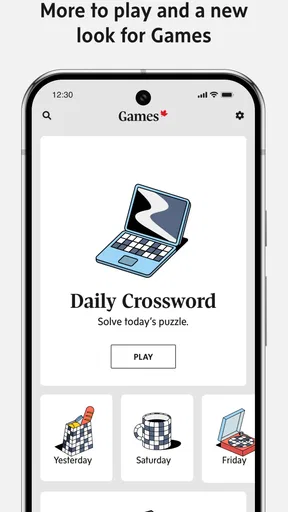
The Globe and Mail app is a premier news application that provides users with access to Canadian and international news. It offers features such as personalized news feeds, real-time updates, and in-depth analysis. Users can also enjoy multimedia content like videos and podcasts, making it a comprehensive news source.
Is The Globe and Mail app free to use, or does it require a subscription?
The Globe and Mail app is free to download, but it offers both free and premium content. While some articles and features are accessible at no cost, a subscription is required to unlock the full spectrum of in-depth articles, exclusive stories, and other premium content.
How often is the content on The Globe and Mail app updated?
Content on The Globe and Mail app is updated continuously throughout the day. Breaking news, live updates, and new articles are added regularly to ensure users have access to the latest information. The app is designed to keep you informed with real-time news coverage.
Can I customize my news feed on The Globe and Mail app?
Yes, The Globe and Mail app allows users to customize their news feed. You can select topics of interest, follow specific sections, and adjust notification settings to receive updates on the stories that matter most to you. This personalization enhances your reading experience.
Is The Globe and Mail app available on both Android and iOS devices?
Yes, The Globe and Mail app is available for both Android and iOS devices. Users can download the app from the Google Play Store or Apple App Store, ensuring accessibility across different platforms. The app is optimized for smartphones and tablets, providing a seamless experience.


